
James "Jim" Hagerman Appointed to Board of Trustees

TRS is pleased to announce the appointment of James "Jim" Hagerman of Springfield to the TRS Board of Trustees.
Mr. Hagerman is a retired partner at Kerber, Eck & Braeckel LLP, a regional CPA and management consulting firm with offices in Illinois, Missouri and Wisconsin and as a member at KEB Asset Management, LLC, an investment advisory firm with offices in Illinois and Missouri.
He served nearly three decades in the firm’s accounting and tax services area and nearly over two decades in the firm’s investment advisory services division. Jim began his early career in 1984 with Deloitte & Touche in Springfield before later joining Kerber, Eck & Braeckel LLP in 1993.
In addition to his professional experience, Jim brings 26 years of service on the Rochester Board of Education and has served on several community boards. He earned an Associate of Accounting from Lincoln Land Community College and a Bachelor of Science in Accounting from Illinois State University.
“Jim brings extensive investment experience and a deep understanding of public education,” said Stan Rupnik, TRS Executive Director & Chief Investment Officer. “His insight will be invaluable as a contributor to the Investment Committee and in guiding TRS toward achieving our mission of delivering expert pension service to Illinois educators.”
“We are proud to welcome Jim to the TRS Board of Trustees,” said Matthew Hunt, TRS Board President. “His decades of service in public education and extensive professional experience will strengthen the Board and enrich our collective efforts to serve Illinois educators.”
Fiscal Year 2025 Annual Financial Report Summary Now Online
Select this link to view the report.
Your Feedback Helps Us Improve: Call Center Survey Live
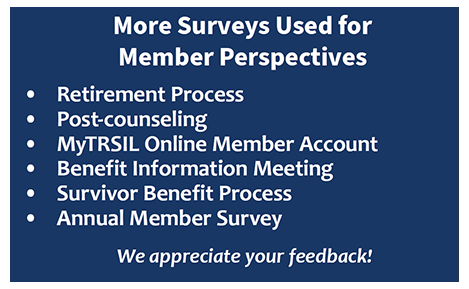
Your feedback is invaluable in helping us improve our services to you during your career and throughout your years in retirement. A survey is now available for members to share how they were supported during their phone call to the TRS Call Center.
You will be prompted at the beginning of the call to choose whether to participate in the survey at the end of the call. The survey is optional but we hope you will participate. Your perspective matters and directly informs how we evaluate and improve our services, processes and communications.
In addition to this new Call Center survey, view the image in this article for some of the other member surveys offered.
New Retirement Claim Tracker Launched in MyTRSIL Member Accounts
As part of our mission of delivering expert pension service, a new tracking feature has been enabled to allow for retirement process transparency. Members can now track how close they are to receiving their first retirement payment.
Starting the retirement process
The retirement process begins with you contacting us about your plan to retire and ends approximately 60 to 90 days after your retirement date when you receive your first annuity payment.
After completing your Personalized Retirement Interview, you will receive your retirement packet from TRS in 10 business days.

Using the tracker
After the packet arrives by mail, you can log into your MyTRSIL member account, trsil.org/myTRSIL, to track the status of your retirement claim in real time. After log in, select Check Claim Status under the My Claims section to see received forms, holds and finalization. The tabs will turn from red to green when complete.
Members can log in and receive a status update online at any time.
New Addition! Webinar Calendar Events Available on TRS Website
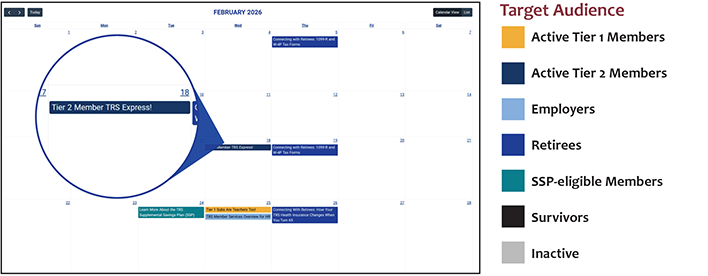
We've made finding and registering for relevant webinars easy for you! To see what events are scheduled for all TRS members and employers, visit the calendar at trsil.org/calendar. Target audiences are defined by different colors on the calendar.
Early 2026 Important Tax Reminder for TRS Retirees
Expect Arrival of 1099-R
If you received a TRS benefit in 2025, the Office of the Comptroller will mail an IRS Form 1099-R to you by Jan. 31, 2026. This form will report your income received from TRS during 2025.
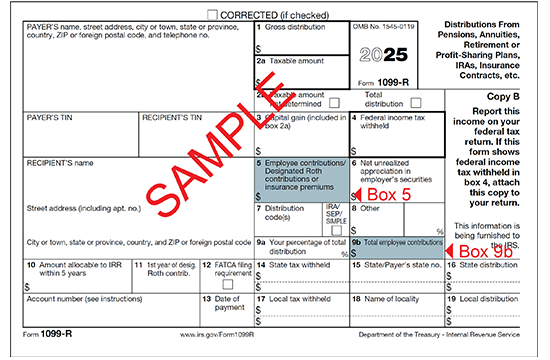
The amount shown in Box 5 on the 1099-R form represents the non-taxable portion of TRS retirement benefits paid to you for the year (see graphic below) and is the difference between Boxes 1 and 2a. Box 5 does not represent the amount of your TRIP premiums for 2025. Box 9B will only have a value if 2025 was the first year that you received a benefit from TRS.
If you do not receive a 1099-R form by Feb. 16, 2026 or you need a duplicate copy sent to you, please log in to your MyTRSIL member account online. Annually after Feb. 16, you may request a duplicate 1099-R online for a prior year. Members may also request a duplicate 1099-R by calling TRS at (877) 927-5877. It may take up to 10 business days to receive your duplicate copy in the mail.
If you have not registered your online MyTRSIL member account, please watch this video to learn how: trsil.org/video/Accessing_MyTRSIL. Your Member ID is required to set up an account.
2026 Pay Date Schedule
Pay dates for TRS monthly benefit payments in 2026 for annuitants and beneficiaries can be found online: trsil.org/pay-dates
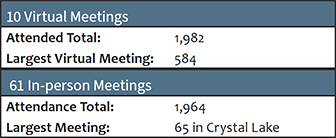
Over 3,900 Members Attend Benefit Information Meetings This Fall
Member Services Benefit Counselors and Outreach staff traveled to 61 locations throughout Illinois to present benefit information in-person to members this fall. Staff also hosted 10 online webinars with the same content.
Meetings explained the TRS benefit structure, including retirement, disability, death benefits and an overview of the TRS Supplemental Savings Plan. The retirement process, health insurance benefits and post-retirement employment were also discussed.
These annual meetings accomplish our TRS Mission of: "Delivering expert pension service to Illinois public educators as they earn their promised retirement security."
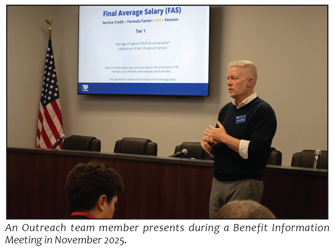
The appreciative feedback received from member surveys is an assurance that we are having "TRS Mission" moments during every event:
- "Everything was super clear and I learned (positive!) things that will be financially beneficial when I retire."
- "All information was very valuable."
- "TRS has done a fabulous job of supporting the retirement of teachers in the State of Illinois for many years."
- "I feel better educated about TRS."
The 2026 schedule will be online in August. An email invite will be sent to all active members with an email on file.
Retiree Outreach Efforts Focus on All Annuitants & Specific Age/Life Phases

Once an educator retires and monthly benefit payments begin, their interest in TRS shifts. The TRS Outreach team has created a series of webinars that focus on TRS topics that are of particular interest to retirees, including taxes, health insurance, third-party account access and death benefits. While some topics are relevant to all benefit recipients, others highlight a topic that is relevant to retirees in a particular age group or phase of life.
Offering TRS information online allows easy access to information about these topics for retirees who are living in every corner of the nation and beyond. Live webinars provide a forum for members to engage with TRS staff from wherever they are and to get answers to their own questions in real time. Recorded sessions are posted to the TRS website, trsil.org/videos, and YouTube channel, youtube.com/@trsillinois, for viewing at any time.
Regular webinars are also being held for those who are receiving a survivor benefit from TRS and those who are preparing to transition to Medicare and the TRAIL health insurance program. Each webinar lasts about one hour and includes time for questions and answers. Visit the calendar, trsil.org/calendar, for details and to register.
Keep Bank Information Current to Ensure Ease of Direct Deposit

It is each member’s responsibility to keep bank information current by notifying TRS when a banking change occurs.
Banking changes include:
- changing a bank account number,
- changing a bank routing number,
- name change of bank,
- address change of bank and/or
- a merger with another banking entity.
Failure to notify TRS when a banking change occurs will result in the loss of direct deposit and the member will receive a paper benefit check.
To update banking information, download a personalized form from your secure online MyTRSIL member account (select “Member Login” upper right on this page). After logging in, select Forms & Reports on the left navigation bar and then select Depository Agreement for TRS Benefits Payments form (Direct Deposit). You may also call Member Services at (877) 927-5877 and request the Depository Agreement for TRS Benefits Payments form (Direct Deposit).
Completed forms may be uploaded in the MyTRSIL secure online area, mailed or faxed.
Annuitants Must Follow Post-retirement Employment Limitations
Don’t Lose Your Retirement Benefit!
Retired TRS members may work 120 days or 600 hours in a TRS-covered position per school year. The 120 days/600 hours limit is in effect through June 30, 2026.
Same School Year Limitation
Annuitants may not resume employment in a TRS-covered position, including substitute and summer school teaching, in the same school year in which they last contributed to TRS. The school year is July 1 through June 30.
Exceeding the Limitations
If an annuitant exceeds post-retirement employment limitations, some of the consequences are:
- retirement annuity will be terminated,
- annuitant will re-enter active membership,
- the employer must remit TRS contributions on all creditable earnings after the employment limitations are exceeded, and
- the annuitant’s TRS retiree health insurance may be impacted.
Circumstances for Repaying Pension Payments
Annuitants will be required to repay all annuity payments in full from the date of retirement, become reportable as an active member for that service and contributions would be required:
- if the retired member resumed teaching in the same school year in which he/she retired, or
- if the retired member exceed the employment limitations in the first school year following retirement.
Track Days and Hours Worked
An annuitant who works in a TRS-covered position must keep track of the hours worked to avoid exceeding the limits and having the significant consequences noted above imposed. Since the beginning of 2025, a notification has been sent from TRS to the retiree explaining the limits when a retiree begins post-retirement work. TRS will send a second notification when the retiree has worked 450 post-retirement hours (as reported by the employer) and the retiree is close to exceeding the limits.
The responsibility rests with annuitants to keep track of their days and hours worked because these statutory limits are mandated by law. Retirees are encouraged to use the Post-Retirement Days Worked Report form, trsil.org/post_retirement_days_worked_2025-2026.
Updated TRS Benefits Reports Online for Active and Inactive Members

Over 246,000 active and inactive members were emailed on Dec. 3 that their TRS Benefits Reports from the past school year were available in their MyTRSIL member accounts online. It is the member’s responsibility to carefully review all information. If any discrepancies are found, the member should contact their employer.
Reports are only sent to members who are not yet collecting a benefit. Retirees do not receive TRS Benefits Reports.
Access Your TRS Benefits Report in Your MyTRSIL Member Account
In April 2025, we successfully implemented enhanced online security for all members using multifactor authentication (MFA) technology. MFA has been enabled so we have a better way to protect your information and peace of mind. If you haven't already done so, you must register your MyTRSIL member account for MFA. You will need your Member ID to complete the registration process and to gain access. If you do not know it, call us at 877-927-5877 (877-9-ASK-TRS).
If you have registration questions, helpful video and instruction links are available on the MyTRSIL sign in page. After you've accessed your account, your TRS Benefits Report is located in the left navigation bar under the Member Information section.
Access your MyTRSIL member account using this link: trsil.org/myTRSIL
Information to Review
Vested Tier 1 and Tier 2 members can view an estimate of their future retirement benefits. This estimate does not include any projected, reciprocal or pending service.
The report also summarizes the following information about a member’s TRS account: service credit, refundable contributions, beneficiary refund, beneficiaries, sick leave service and 2.2 upgrade information.
Recent payments and changes in outstanding balances will not be reflected on the report but will be shown in a member’s online account.
Change a Beneficiary
To change beneficiaries, download your personalized Beneficiary Designation form within your MyTRSIL member account. Print, complete and sign the form with a wet ink signature. Mail it to the Springfield office or upload it online and we will update your file. A new Beneficiary Designation form replaces any former version on file with TRS.
Correct Errors
If you see an error on your reported service record or salaries, contact your employer (school district) without delay to correct the problem. This information is reported by your employer on your behalf to TRS. It may be more difficult to correct an error if you wait until retirement.
Please call us if you believe your report has an error (other than salary or service credit) or if you have questions about the content.
Didn’t Receive a Benefits Report Email?
If you are an active or inactive member who has not provided your email address to TRS and you received this newsletter by mail, please visit trsil.org. Select “Member Login” on the home page to begin creating your MyTRSIL member account. You will need your Member ID. If you do not know it, call us at 877-927-5877 (877-9-ASK-TRS). You will be able to view your TRS Benefits Report after signing in.
Additionally, please enter your email address under the contact information area so you will receive future emails from us.
TRS Receives Prestigious Awards for Financial Reporting & Administration
Certificate of Achievement for Excellence in Financial Reporting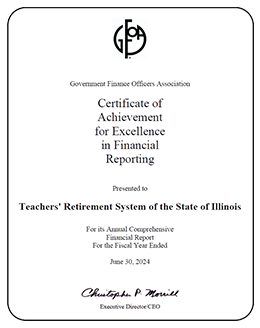
TRS’s annual comprehensive financial report for the year ended 2024 was awarded the Certificate of Achievement for Excellence in Financial Reporting by Government Finance Officers Association of the United States and Canada (GFOA). This was the 36th consecutive year that the System has achieved this prestigious award. |
Recognition Award for Administration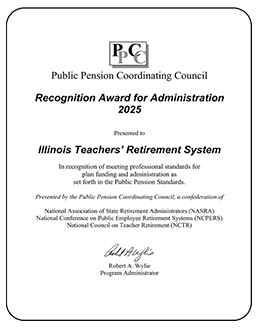
TRS received the Recognition Award for Administration in 2025 in recognition of meeting professional standards for plan administration as set forth in the Public Pension Standards of the PPCC. The award is presented by the PPCC, a confederation of the National Association of State Retirement Administrators (NASRA), the National Conference on Public Employee Retirement Systems (NCPERS) and the National Council on Teacher Retirement (NCTR). |
Recent Life Change? Remember to Check Your Beneficiary Designation
The Beneficiary Designation form allows you to designate beneficiaries for TRS death benefits. Periodically review your beneficiary designation and be sure to change it whenever necessary. Some events that may require a beneficiary update include: marriage, divorce, births, deaths or dependents reaching adulthood.
If you are an active member, your TRS Benefits Report contains your designated beneficiaries. You may view this in your MyTRSIL member account online.
To create or update your beneficiary designation, download your personalized form by logging into your MyTRSIL member account. Start by selecting the Member Login button on the top right corner of the TRS website. After logging in, select Forms & Reports on the left navigation bar. Then select Beneficiary Designation form.
Part of the form will be prefilled with information on file for you. If you cannot access your online account, email members@trsil.org and provide your full name, last 4 digits of your Social Security number and mailing address and we will mail the form to your address.
To quickly and efficiently send the completed form back to TRS, use the Document Upload feature located on the left navigation bar within the secure area. You may also fax it to 217-753-0964 or mail it to the Springfield office.
Role of TRS
TRS provides expert pension services to Illinois public educators, ensuring their promised retirement security. Governed by a 15-member Board of Trustees, TRS operates as a fiduciary, managing benefits and assets responsibly, in compliance with the law and in the best interests of our members.
TRS does not have the authority to write or pass legislation. Such decisions rest with the Illinois General Assembly. TRS serves as a reliable resource to legislators and stakeholders, providing subject matter expertise on pension-related matters.
For legislative concerns, members should contact their state representatives. TRS is committed to delivering exceptional service and support to all members.
Winter 2026 | Published by the Teachers' Retirement System of the State of Illinois.